Back up your email
Outlook for Office 365, Outlook 2019, Outlook 2016, Outlook 2013
This page was copied from:
https://support.office.com/en-ie/article/back-up-your-email-e5845b0b-1aeb-424f-924c-aa1c33b18833
If you are using email for work, you are most likely using an Exchange or IMAP account. Exchange and IMAP servers automatically archive your email so that you can access it anytime or anywhere. If you have an Exchange account, check with your admin about how to access your archived email.
If you want to back up the message folders locally (in addition to keeping them on the server), you can automatically move or delete older items with AutoArchive or export the items to a .pst file that you can restore later as needed and use by importing.
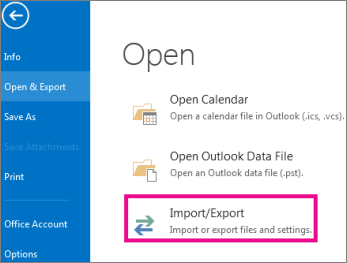
1. Select File > Open & Export > Import/Export.
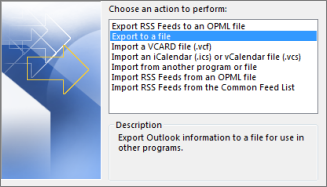
2. Select Export to a file, and then select Next.
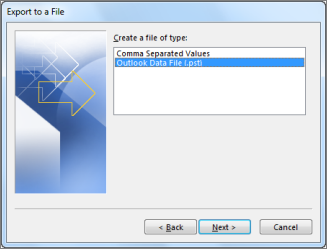
3. Select Outlook Data File (.pst), and select Next.
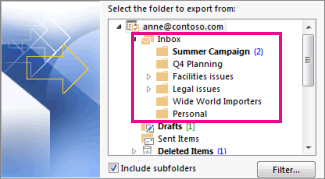
4. Select the mail folder you want to back up and select Next.
5. Choose a location and name for your backup file, and then select Finish.

6. If you want to ensure no one has access to your files, enter and confirm a password, and then select OK.
The messages that you keep in a .pst file are no different from other messages. You can forward, reply, or search through the stored messages as you do with other messages.